
Ink Player Review: Features, Pricing, and Verdict
Most WordPress video players make you choose. You get a pretty player or real marketing tools. You get self-hosted video or YouTube, but rarely both in one place.
In this Ink Player review, we walk through what the plugin does, what it costs, and who it fits best.
A quick note first: our team at Brighter Fox built Ink Player. We kept running into that same gap on our own sites, so we set out to close it.
Short verdict: Ink Player gives you one branded player for every video source, plus overlays, ads, lead capture, and analytics. Every feature comes on every plan, so you only pay for the number of sites you need.
What Is Ink Player?
Ink Player is a WordPress plugin that adds a branded video and audio player to your site. It plays your own uploads, YouTube, Vimeo, and pro streaming services through one consistent player.
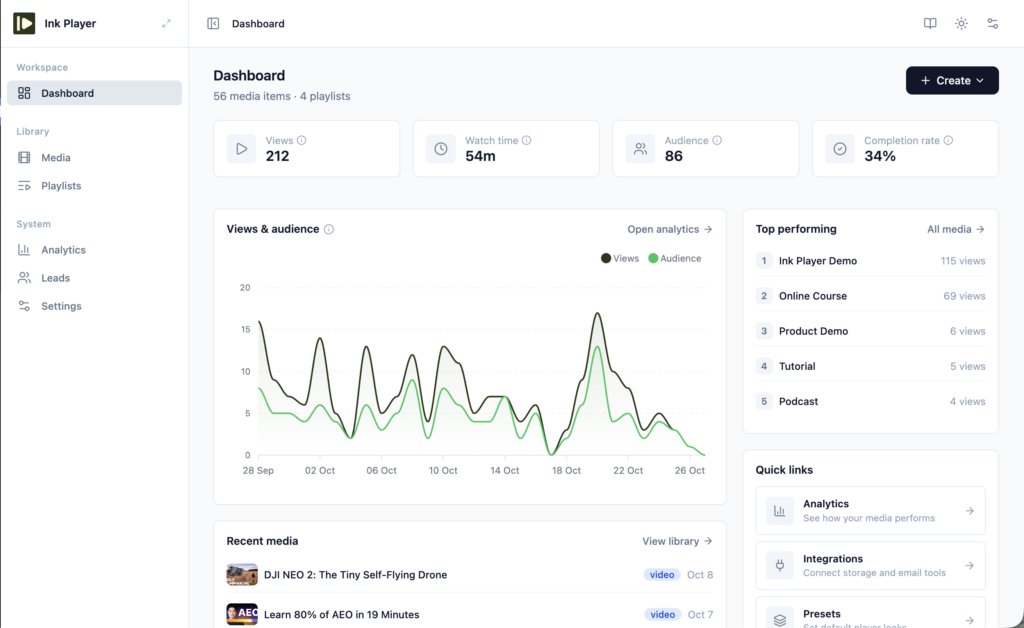
You manage everything from a clean dashboard inside WordPress. Upload or link a video once, and you can drop it into any page, post, or product.
The player does more than play. You can add calls to action, email capture forms, and ads right on top of your videos. You can lock videos to logged-in members, put them behind a password, or show them only to paying WooCommerce customers.
It suits course creators, membership sites, podcasters, SaaS teams, online stores, and agencies that run many client sites.
Ink Player at a Glance
| Ink Player | |
|---|---|
| Video sources | Self-hosted, direct links (MP4, HLS, DASH), YouTube, Vimeo, Bunny.net, Mux, Cloudflare Stream, Cloudflare R2 |
| Places to use it | Gutenberg blocks, shortcodes, Elementor, Beaver Builder, embed codes, share links, popups |
| Money tools | Overlays, email capture, VAST ads, custom pre-roll, mid-roll, and post-roll |
| Price | From $79 a year or $149 lifetime |
| Refund window | 30 days |
| Best for | Creators and businesses who want one player for every source |
Edit Once, Update Everywhere
This is the feature you will feel every day. Each video or audio file lives as a single record in the Ink Player library.
Every block, shortcode, widget, and playlist pulls from that record. Change a title, swap a poster, or add a caption track once, and every page that shows the video updates on its own. No more hunting through 40 posts to fix one link.

You can place a video with a Gutenberg block, the Elementor widget, the Beaver Builder module, or a shortcode like [ink_player id="123"]. Need it on a site that doesn’t run WordPress? Copy the embed code and paste it anywhere. Your skin, overlays, and access rules come along with it.
You can also open a video in a popup from a poster, button, or text link. Nothing loads until the visitor clicks, so your page stays fast, and the video can play with sound right away.
One Player for Every Source
Ink Player handles 9 source types. You can upload to your own media library or paste a direct MP4, HLS, DASH, or MP3 link. It also plays YouTube and Vimeo, plus pro streaming from Bunny.net, Mux, Cloudflare Stream, and Cloudflare R2.
Paste a URL and Ink Player detects the source for you. Whatever the source, your visitors see the same branded player.
Access control sits on every video. You choose who can watch: everyone, logged-in members only, or anyone with a password.
For paid content, pair Ink Player with Bunny.net, Mux, Cloudflare, or a protected upload. These sign the video link itself, so a copied file address stops working after a short time.
Skins, Presets, and Branding
You get 6 video skins, from the full Classic player to Minimal and Floating Bar. Audio gets 3 layouts of its own. Set your brand color, corner radius, and icon colors, and add your logo as a watermark.
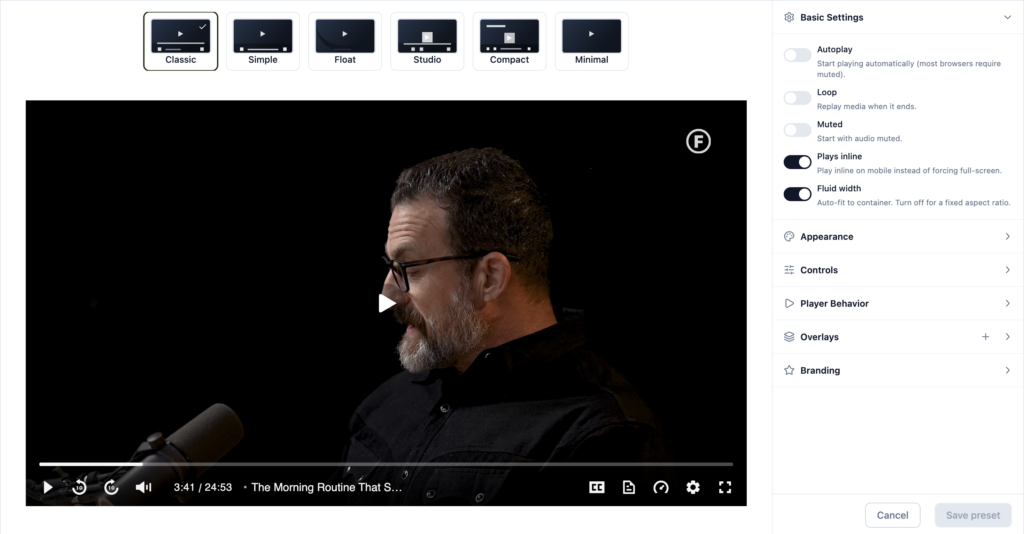
Presets save you the most time. A preset bundles a skin, controls, behaviours, overlays, and branding into one reusable setup. Build one for course lessons and one for product demos, then apply each with a click.
The player also covers the details viewers expect. You get chapters, captions with a searchable transcript, playback speed from 0.25x to 2x, picture-in-picture, sticky video on scroll, and resume where you left off.
Overlays and Ads That Turn Views Into Results
Overlays let your video do the selling. Ink Player has 9 types:
- Text, CTA buttons, and action bars (including a YouTube subscribe bar)
- Email capture forms
- Image banners, with an optional Ad badge
- Hotspots that link, jump to a time, or pause the video
- Watermarks that move around to discourage screen recording
- Shortcodes, so a booking widget, quiz, or contact form can appear inside the video
- Custom HTML
You decide when each one shows. It can stay up the whole time, appear after 50% of the video, or show only between two timestamps.
Ads work the way publishers expect. Run pre-roll, mid-roll, and post-roll ads with your own video or a Google VAST or VMAP tag. Set global ad breaks for the whole site, then override them on any single video. Ads run on self-hosted video, Bunny.net, Mux, and direct video files.
Playlists, Including YouTube and Vimeo Import
Already have a YouTube playlist? Paste the link and Ink Player imports up to 100 videos without an API key. Vimeo channels, groups, and showcases import too, with a Vimeo access token.
You can also build playlists from your own library. Pick a list beside the player, a grid of 2 to 6 columns, or a slider. Turn on auto-play next, shuffle, or repeat, then drop it on any page with [ink_playlist id="45"].
For course creators, this alone can save an afternoon. Your lessons stay in order, and every one plays in your branded player instead of YouTube’s.
Analytics and Lead Capture
Switch on the built-in analytics and you see views, unique viewers, watch time, and completion rate for every video. A real-time tab shows viewing activity from the last 90 seconds. It stores no IP addresses or locations, which keeps privacy reviews simple.

Prefer Google Analytics? Paste your GA4 Measurement ID. Ink Player sends start, 10%, 25%, 50%, 75%, and complete events with no extra setup.
The email capture overlay turns viewers into subscribers. Every lead lands in a Leads table inside WordPress, with duplicates merged by email. From there, Ink Player can send each one to Mailchimp, MailerLite, ActiveCampaign, FluentCRM, or any tool that accepts a webhook.
WooCommerce: Videos for Paying Customers
Ink Player adds a video tab to every WooCommerce product. Attach a video or playlist and show it before the short description, after the description, or in its own tab.
The best part is the Purchasers only setting. The video unlocks once a customer’s order is completed. That makes selling a video course or a premium tutorial as simple as listing a product.
Ink Player vs Presto Player and FluentPlayer
Presto Player and FluentPlayer are the two players people ask us about most. Here is where Ink Player pulls ahead, based on each vendor’s own pages at the time of writing.
| Ink Player | Presto Player | FluentPlayer | |
|---|---|---|---|
| Import a whole YouTube or Vimeo playlist | Yes | No | No |
| Google VAST and VMAP ads | Yes | No | No |
| Cheapest lifetime license | $149 | $399 | $199 |
| Refund window | 30 days | 14 days | 14 days |
Already using one of them? Switching is simple. Ink Player imports from both Presto Player and FluentPlayer, free and Pro.
The import brings over your videos with their chapters, captions, overlays, and email gates. Your presets, playlists, collected emails, analytics history, and settings come too. It never touches your old plugin, and one click undoes the whole import.
When it finishes, Ink Player lists every page that still uses an old embed. Each one comes with a ready [ink_player id="…"] shortcode to paste in its place.
Ink Player Pricing
Every plan includes every feature. The only difference is how many sites you can use it on.
| Plan | Sites | Annual | Lifetime |
|---|---|---|---|
| Starter | 1 | $79/year | $149 |
| Pro | 10 | $159/year | $299 |
| Agency | 30 | $299/year | $499 |
Annual plans include a year of updates and support. Lifetime plans include updates for life. Both come with a 30-day money-back guarantee. Check the pricing plans and choose the one that best fits your business.
Verdict: Who Ink Player Is For
Ink Player fits anyone who wants every video on their site to look and work the same, wherever it is hosted. Course creators get imported playlists and member-only lessons. Stores get product videos that unlock after purchase.
Marketers get overlays, email capture, and VAST ads in one plugin. Agencies get one setup they can reuse across up to 30 client sites. And if you run Presto Player or FluentPlayer today, the built-in import makes the move easy.
Frequently Asked Questions
Does Ink Player work with Elementor and Beaver Builder?
Yes. Ink Player adds an Elementor widget and a Beaver Builder module, and both switch on automatically when the builder is active. You can also use Gutenberg blocks or shortcodes.
Can I use Ink Player videos outside WordPress?
Yes. Every video and playlist has an embed code you can paste on any website. The embed keeps your skin, overlays, and access rules.
Can I move my videos from Presto Player or FluentPlayer?
Yes. The built-in import brings over your videos, playlists, presets, leads, analytics history, and settings. Your old plugin stays untouched, and you can undo the import in one click.
Which Ink Player plan should I choose?
Pick by site count. Starter covers 1 site, Pro covers 10, and Agency covers 30, with every feature on every plan.
How do I get started?
Get Ink Player first, install the plugin on your WordPress site, then add your first video from the library.